
Frequently Asked Questions
How Do I Update MAKID?
MAKID checks for updates automatically and will notify you when one is available. You can also manually check in Settings. Updates download automatically and just require a restart to install.
Are My Files Safe and Private?
Yes! MAKID is a layer over your existing file system. Your audio files stay exactly where they are on your computer. The only time files leave your computer is when you explicitly choose to share a bounce through MAKID Cloud.
How Can I Delete All My MAKID Data?
Deleting MAKID.db resets MAKID’s local index, but it does not permanently
delete your project metadata.
- Go to Settings → Show Database File
- Delete the
MAKID.dbfile - Restart MAKID
MAKID stores recovery data in each project’s hidden .MAKID folder. When you import or resync those project folders, MAKID recreates notes, comments, tags, collections, stable file references, and other authored metadata from the newest available recovery data.
To permanently delete your MAKID data, also delete the .MAKID folders inside your projects and delete any data stored in MAKID Cloud. This cannot be undone.
Recent changes may be unavailable if a project folder was read-only or offline when MAKID tried to update its recovery data, the hidden .MAKID folders were not copied, or none of the imported projects contains the newest workspace recovery file.
Why Aren’t My Projects Loading?
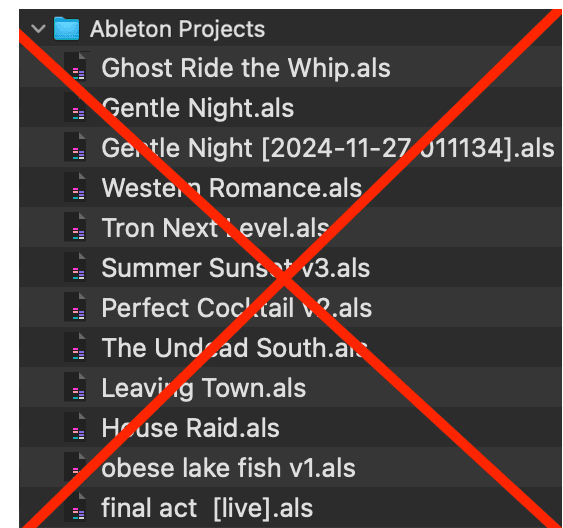
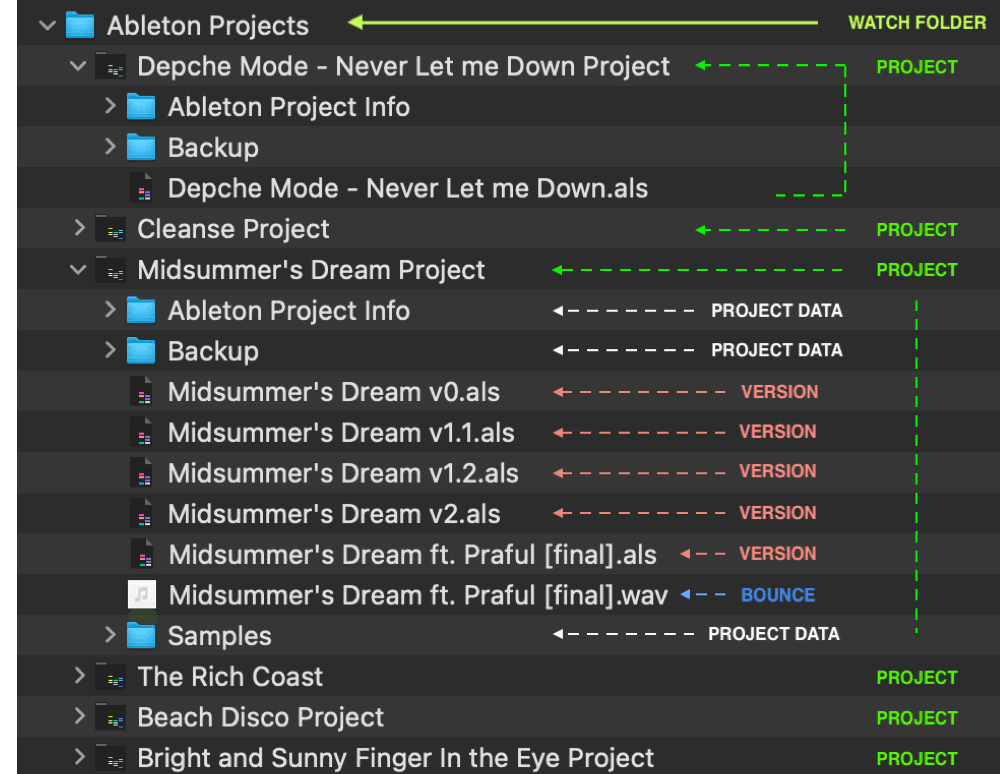
Most Common Issue: You’re watching a folder of individual .als files instead of proper Ableton project folders.
Watch this video [1 min.]
The Ableton Certified trainer explains his method of saving and organizing projects. Importantly he illustrates how Ableton saves projects and the key distinction between a version & a new project.
For each .als you consider a “project”
Open in Ableton Save Live Set As into your watch folder / parent project folder
Ableton automatically creates the necessary folders & data as long as you are not saving inside an existing project folder OR your User Library folder.
If you have the correct file management setup but you’re still experiencing issues, please message us in our Discord !
A Project Shows a Warning Icon
- MAKID can’t find the original project folder. It was moved, renamed, or deleted.
- Fix by re-importing the folder from its new location (keeps all metadata), or archive/delete the entry if you intentionally removed the folder from your drive.
Can I Use MAKID Offline?
Absolutely! All core features work offline. Cloud features (sync and sharing) require internet, but everything else works without any connection.
How Do I Share Projects with Collaborators?
Use the bounce sharing feature to upload audio files and share secure links. For full project sharing, you’ll need to use your normal file sharing methods since MAKID keeps projects local.